
Conditional formatting
ArionUI.Formatting · free during the preview, also commerciallyRules the user creates and edits at runtime, the way a spreadsheet offers them: comparisons, top and bottom N, above or below average, duplicates, data bars, colour scales and status icons, with a rule manager and an fx marker on columns that carry a rule.
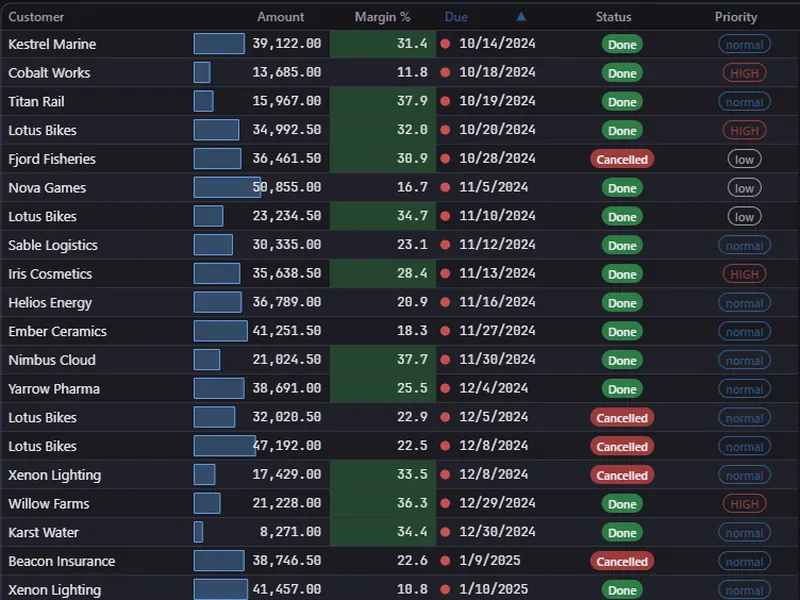
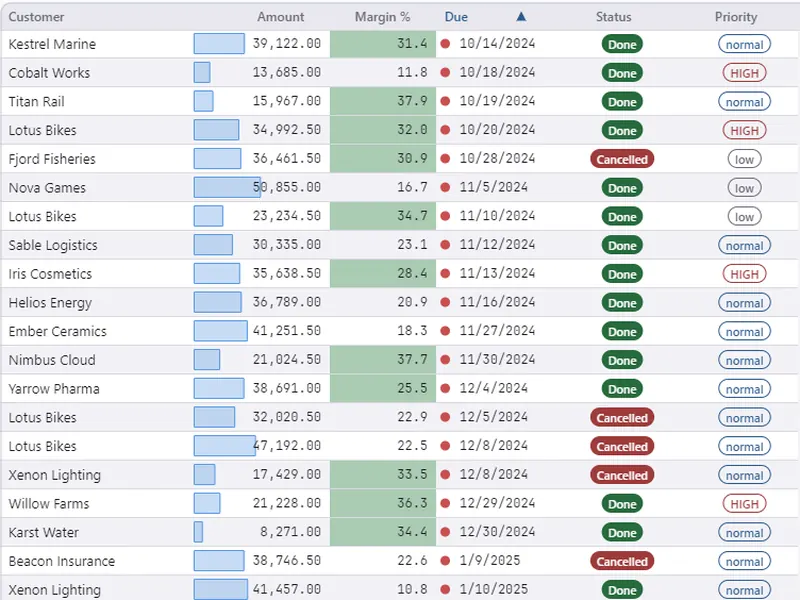
Install and enable
dotnet add package ArionUI.Formatting --prereleaseConditionalFormatting rules = view.Formatting(); // one rule set per view
rules.EnableFormattingMenus(grid.Api, view); // header menu entries and the fx markerview.Formatting() returns the rule engine of that view, created on first access; asking twice gives the same one. EnableFormattingMenus adds the rule entries to the column header menu and the fx marker to the column list. Without it the grid shows neither, and rules added from code still draw.
Column.Style(…) and StyleRule are part of the open engine and need no package — see Theming and styling. This module is for rules that are data: listed, edited and saved by the user.
Rules from code
int amount = view.ColumnIdOfKey("amount");

rules.AddConditionalRule(new ConditionalRuleInfo(
    ElementId: amount, Op: FilterOperator.GreaterThan, Value: "10000",
    Background: null, Foreground: Palette.Red, Bold: true, WholeRow: false));

rules.AddConditionalRule(new ConditionalRuleInfo(
    ElementId: amount, Op: FilterOperator.Equals, Value: "",
    Background: Palette.Blue, Foreground: null, Bold: false, WholeRow: false,
    Kind: ConditionalStyleKind.DataBar));             // Op and Value are unused for scales

rules.AddConditionalRule(new ConditionalRuleInfo(
    ElementId: amount, Op: FilterOperator.Equals, Value: "5",
    Background: Palette.Amber, Foreground: null, Bold: false, WholeRow: true,
Condition: ConditionalCondition.TopN)); // the five largest, whole rowConditionCompare(operator and value, the default),TopNandBottomN(Valueis N),AboveAverage,BelowAverage,Duplicates. Statistics are computed over the current filtered view when filter or grouping change, never per frame.KindCellStyle(colours and bold, the default),DataBar,ColorScale2,ColorScale3,IconSet. For the scale kinds,Backgroundis the bar or minimum colour,Color2the maximum (or middle) colour andColor3the maximum of a three-colour scale; operator and value are not used. Scales need a numeric column — one that declares a summary value.WholeRow- Style the whole row instead of the cell.
AddConditionalRule returns the rule's id, which UpdateConditionalRule, RemoveConditionalRule and MoveConditionalRule take. ConditionalRulesOf(elementId) and AllConditionalRules() list them; ClearConditionalRules(elementId) removes a column's rules.
The rule manager
rules.ShowFormatRuleManager(grid.Api, view, new LogPoint(40, 40));The manager lists every rule in priority order, opens the rule editor, and moves and deletes rules. ShowFormatRule opens the editor for one column. The dialog texts are German by default; FormattingUiText.English() switches them, and FormattingUiText.ConditionPresets sets the presets offered.
Rules travel with a saved layout: layout persistence captures them with ArionLayoutParts.ConditionalRules.