
Live data
Readings from a device, a socket or a simulation arrive in packets, at their own pace. LiveSeries keeps them with their times; LivePlayback shows them on the display's frames, a little behind, so a trace slides evenly instead of jumping with every packet.
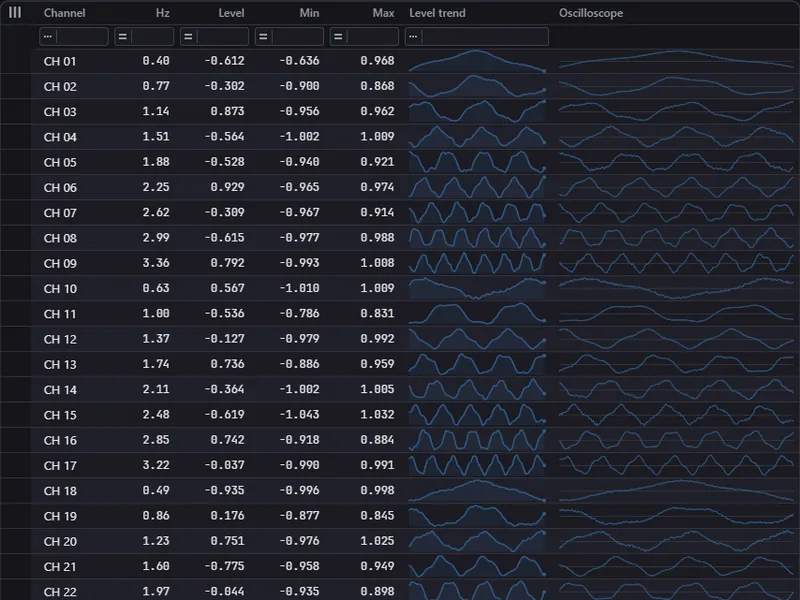
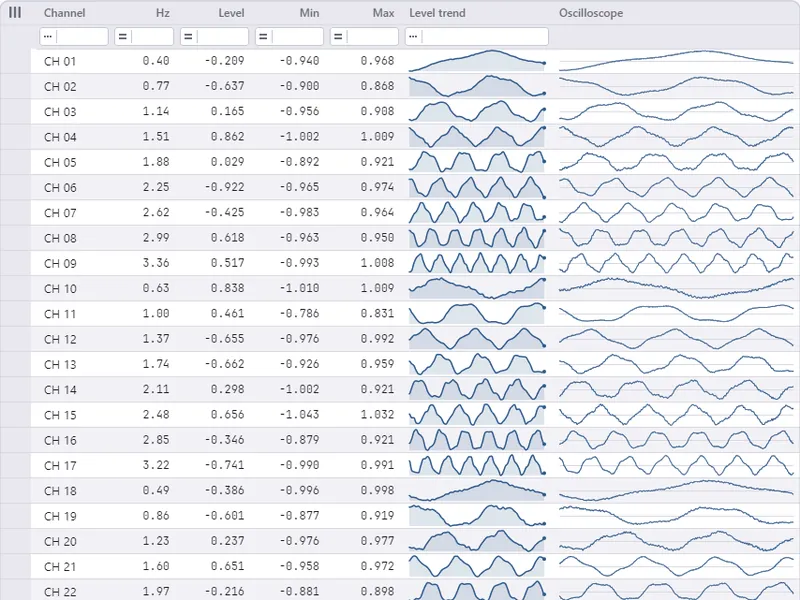
Why a playback
A source rarely delivers in step with the screen. Thirty packets a second on a 60 Hz display means a new packet on every second frame, and in practice not even that: packets come early, late, two at once. Drawn as they arrive, a trace stands for a frame and then jumps by a packet. The playback takes that out. It stays a little behind the newest reading and moves on by the display time of each frame, so every frame shows the same amount of new data, however unevenly it came in. It never shows more than has arrived.
Both types are in ArionUI.Core, part of the open core. They hold numbers and times and draw nothing; what shows the numbers is your choice — a sparkline cell, a number column, a chart.
The series
A LiveSeries is one row of readings with their times, in a ring of fixed capacity: the oldest go first. Make one per channel. Appending is safe from the source's own thread while the UI thread reads.
// Room for 2,000 readings; the source delivers 240 a second.
var samples = new LiveSeries(capacity: 2_000, sampleRate: 240);

// On the source's thread, for every packet - the times are set on arrival:
samples.Append(packet);
Set on arrival, the readings of a packet are spread evenly: by the sample rate when you pass one, otherwise over the time since the previous packet. A source that settles at another pace is followed after a few packets. When the source knows its own times — a device that numbers its samples — pass them instead:
var spacing = TimeSpan.FromSeconds(1.0 / 240);

// The device numbers its samples; this packet starts at number firstSample.
samples.Append(packet, firstAt: firstSample * spacing, spacing: spacing);
A series takes one of the two, not both: times set on arrival and times from a source do not share a clock. A reading of NaN is a gap, and a line breaks there. Count, Capacity, Newest and PacketInterval tell you what the series holds; Dropped and Restarts count what it refused (see Limits).
The playback
A LivePlayback is the position a view shows. Once per frame you call Advance with the frame's display time, then read. Use the grid's frame tick, grid.Api.Timing.Every: it falls on the display's vertical blanks and passes in the display time the tick stands for, which is exactly what Advance wants.
var playback = new LivePlayback();           // Delay null: measured from the packets
var trace = new double[400];

var frames = grid.Api.Timing.Every(TimeSpan.FromMilliseconds(16), elapsed =>
{
    playback.Advance(elapsed, samples);      // on by the display time of this frame

    int n = playback.Read(samples, trace);   // up to the position, newest last
    trace.AsSpan(0, trace.Length - n).Fill(double.NaN);   // not there yet: a gap

    double level = playback.ValueOf(samples);
});

frames.Dispose();   // stops it
Read(series, into)- The readings up to the position, the newest last, written into the end of the span. Answers how many — fewer than the span holds while the series is young.
Read(series, into, out fraction)- The same, plus the reading after the position in the last place and how far the position has gone towards it (0 to 1). This is what a sliding trace needs.
ValueOf(series)- The value at the position, read off the line between the two readings around it: where a sliding trace meets its right edge. A level shown beside the trace uses this, so the row shows one moment.
RangeOf(series, readings)- The lowest and highest of what a sliding trace of that many places shows, gaps left out.
Position·Delay·DelayFor(series)- The time the view shows, in the series' time; the delay you set; the delay in force.
Without a Delay the playback measures one: one packet interval plus one and a half frames. Until the second packet there is no interval to measure, and the view shows what came, as it would without a playback.
Sliding traces in cells
A sparkline that just gets the newest readings jumps by a whole reading at a time. A sliding one moves by a fraction of a reading per frame. It takes an ISlidingValues: the readings plus one more — the one it is moving towards — and a Shift that says how far it has moved. The playback's Read with a fraction fills exactly that.
/// <summary>A trace that slides: one reading more than it shows, and how far it has moved.</summary>
public sealed class Trace(int shows) : ISlidingValues
{
    private readonly double[] readings = new double[shows + 1];

    public double Shift { get; private set; }

    public int Count => readings.Length;

    public double this[int index] => readings[index];

    public void Take(LivePlayback playback, LiveSeries series)
    {
        int n = playback.Read(series, readings, out double fraction);
        Shift = fraction;
        readings.AsSpan(0, readings.Length - n).Fill(double.NaN);   // not there yet: a gap
    }

    public IEnumerator<double> GetEnumerator() => ((IEnumerable<double>)readings).GetEnumerator();

    System.Collections.IEnumerator System.Collections.IEnumerable.GetEnumerator() => readings.GetEnumerator();
}
The cell draws on the render thread while the UI thread prepares the next frame, and a drawn cell may still read the trace of the frame before. So a row does not write into the trace it last handed out; it takes turns over a few. Shift and readings travel together in one object, so a drawing always reads both from the same frame.
public sealed class Channel : INotifyPropertyChanged
{
    // The render thread may still be drawing the last frame's trace: take turns over four.
    private readonly Trace[] traces = [new(400), new(400), new(400), new(400)];
    private int next;

    public event PropertyChangedEventHandler? PropertyChanged;

    public string Name { get; init; } = "";

    public LiveSeries Samples { get; } = new(capacity: 1_600, sampleRate: 240);

    public Trace Scope { get; private set; } = new(400);

    public double Level { get; private set; }

    public double Min { get; private set; }

    public double Max { get; private set; }

    /// <summary>Once per frame, on the UI thread: every column at the playback's position.</summary>
    public void Show(LivePlayback playback)
    {
        var scope = traces[next];
        next = (next + 1) % traces.Length;
        scope.Take(playback, Samples);
        Scope = scope;
        Level = playback.ValueOf(Samples);
        (Min, Max) = playback.RangeOf(Samples, scope.Count);   // what the trace shows

        PropertyChanged?.Invoke(this, new(nameof(Scope)));
        PropertyChanged?.Invoke(this, new(nameof(Level)));
        PropertyChanged?.Invoke(this, new(nameof(Min)));
        PropertyChanged?.Invoke(this, new(nameof(Max)));
    }
}var channels = Enumerable.Range(1, 48).Select(i => new Channel { Name = $"CH {i:00}" }).ToList();
var view = new GridView<Channel>(
[
Column.Text<Channel>("Channel", c => c.Name).WithWidth(80),
TypedColumn.Number<Channel>("Level", c => c.Level, format: "0.000").Sortable(c => c.Level),
TypedColumn.Number<Channel>("Min", c => c.Min, format: "0.000"),
TypedColumn.Number<Channel>("Max", c => c.Max, format: "0.000"),
Column.Composed<Channel>("Oscilloscope", new SparklineEl(o => ((Channel)o).Scope)
{
FillArea = false,
ShowLastDot = false,
Thickness = 1,
ScaleMin = -1, // a fixed scale: the picture does not breathe with the data
ScaleMax = 1,
}).Fill().DependsOn(nameof(Channel.Scope)),
],
new ObservableItemsSource<Channel>(channels), rowHeight: 34).AsDataGrid();Column.Sparkline takes any IReadOnlyList<double>, so a Trace works there too — with hover guide, tooltip and the values as text for copy and the screen reader. A sliding trace draws no last dot. It is still an ordinary grid: sort it by level, filter it, scroll it while it runs. Only the cells whose values changed repaint; raising PropertyChanged only for values that look different keeps that small. A sorted live grid moves rows under the reader's eyes; view.SettleSuspended or SettleIntervalMs holds the moves back (see Data sources).
Many channels, one moment
Give every channel its own series and all of them one playback. For that, the series must share a clock: append with the source's own times. Advance with the series the source writes last — it is the one all others already have — and every row shows the same moment.
var playback = new LivePlayback();

var frames = grid.Api.Timing.Every(TimeSpan.FromMilliseconds(16), elapsed =>
{
    // Every channel on the source's clock, written one after the other: the last one
    // written is the one all others already have.
    var before = playback.Position;
    playback.Advance(elapsed, channels[^1].Samples);
    if (playback.Position == before && before is not null)
    {
        return;   // nothing new to show: no repaint
    }

    foreach (var channel in channels)
    {
        channel.Show(playback);
    }
});
The channel wall in the showcase runs this way: 16, 48 or 200 channels, a source thread at 10 to 60 packets a second, and a trend column fed from a second series per channel on the same clock.
Charts and whole items
A streaming chart takes readings with ChartView.Append and redraws without a new layout. The signal lab in the showcase appends to it on the frame tick, by the time that passed, so a late frame does not slow the signal down.
A playback can also pace things that are not numbers. A spectrum waterfall gets a whole line when a line's samples are complete — at high rates, two in one frame. A series of line numbers lets them in evenly:
// When each line was complete, by its number: 20 lines a second.
var arrivals = new LiveSeries(256, sampleRate: 20);
var pending = new Queue<(long Line, float[] Values)>();
var playback = new LivePlayback();
long nextLine = 0;

// As soon as a line's samples are all there:
pending.Enqueue((nextLine, line));
arrivals.Append([nextLine]);
nextLine++;

// Every frame: let in the lines up to the playback's position.
playback.Advance(elapsed, arrivals);
Span<double> shown = stackalloc double[1];
if (playback.Read(arrivals, shown) > 0)
{
    while (pending.TryPeek(out var next) && next.Line <= (long)shown[0])
    {
        waterfall.Append(pending.Dequeue().Values);
    }
}
Smoothing on and off
A delay of zero turns the buffer off: every frame shows the newest reading, as a view without a playback does. That is the honest choice when the newest value matters more than an even picture. A fixed delay is possible too.
var playback = new LivePlayback { Delay = smooth ? null : TimeSpan.Zero };

// The text for a smoothing switch, with the delay in force:
string hint = ArionUiText.LiveSmoothing(smooth ? playback.DelayFor(samples) : null);

// Or a delay of your own:
playback.Delay = TimeSpan.FromMilliseconds(100);
The built-in text reads “on: display … ms behind the data, smooth” or “off: display at once, jumps with each packet”, in German after ArionUiText.UseGermanTexts(), and can be replaced like every other text (see Localisation). The showcase scenes put it on their “Live smoothing” switch.
Pauses
When the data stop, the playback stops at the newest reading and the trace stands. When they come back it goes on without a jump. With times set on arrival, a pause in the data is not a pause in the series: the next packet goes on where the last one ended. With the source's own times, a pause of more than a second is taken as a jump of the source's clock, and the view jumps with it.
There is no pause button in the API. To freeze a view, stop advancing it; the series keep collecting up to their capacity. Behind by more than the delay — a busy UI thread, a hang, a view you held — the playback catches up over a few frames; behind by far more, it jumps to where it should be rather than racing through what is past.
Limits
- One clock per series. Times set on arrival and the source's own times cannot be mixed in one series. Rows that share a playback need a shared clock, which means source times.
- Readings only move forward. A reading not newer than the newest is dropped and counted in
Dropped. One far older — more than a second, or four packet intervals — starts the series anew and counts inRestarts, as when a source restarts its clock. - Fixed capacity. The oldest readings go first; a packet larger than the capacity keeps only its last readings. The capacity is at least 2.
- Several readings need a spacing. With source times, a spacing of zero is allowed only for a single reading; readings at one moment have no order to show.
- A playback belongs to one thread.
Advanceand the reads run on the same thread, the UI thread in practice. The series is safe to share; the playback is not. - Behind by design. With smoothing on, the view shows the data a packet interval and a frame and a half late. For a reading that must be shown the moment it arrives, set the delay to zero.
- Numbers only. A series holds
doublereadings. Anything else — a waterfall line, an event — is paced through a series of its numbers, as above.