
Replace a DataGridView without rewriting the form
Many WinForms line-of-business apps have the same form somewhere: a DataGridView on a BindingSource over a DataTable, a few text boxes bound to the same source, and the rules in event handlers. This article moves such a form to ArionUI one piece at a time, while the business logic stays exactly where it is.
The form we start from
The repository has a sample for this, samples/ArionUI.Sample.WinFormsModernize. It is a small order form of the kind many business applications are built from. On the left is a grid of orders. On the right is a panel with customer, quantity, price and a “Delivered” check box. Above it there is a tool bar with New, Save and Ship, and below it a status line. All of it hangs on one BindingSource:
var orders = new BindingSource { DataSource = ordersTable };
split.Panel1.Controls.Add(new DataGridView { Dock = DockStyle.Fill, DataSource = orders });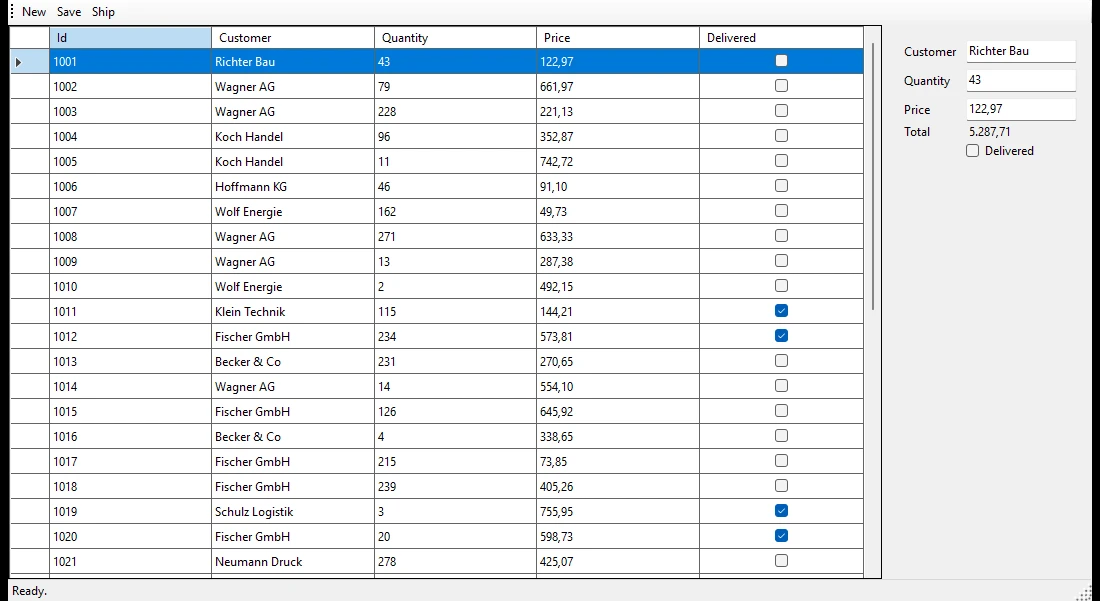
samples/ArionUI.Sample.WinFormsModernize, WinForms, screenshot of the running sample (0.1.0-preview.1).The rules live in a class the sample calls OrderRules, as an old application keeps them: the table itself, a validation in ColumnChanging, and the methods the buttons call.
// OrderRules.cs - unchanged in every step
table.ColumnChanging += (_, e) =>
{
    if (e.Column?.ColumnName == "Quantity")
    {
        e.Row.SetColumnError(e.Column, e.ProposedValue is int q && q < 0 ? "The quantity must not be negative." : "");
    }
};
The point of the sample is that this file is shared by all four forms, the original and the three steps. If a step needs this file changed, the step is wrong.
Why from the inside out
A full rewrite of such an application tends to stumble less over the new UI than over everything the old one quietly did: the rule in a handler nobody remembers, the column that is read-only for one customer group, the tab order the users rely on. Moving form by form keeps the application shippable the whole time, and every step can be tested against the one before.
The order of the steps is not a matter of taste. ArionUI goes into an existing window as ordinary controls — ArionGridControl and ArionControlSurface on WinForms. Each one replaces a piece of the old window, and the old code around it keeps running. The reverse does not work: a native WinForms control cannot go inside an ArionUI board. So the replacement starts with the innermost piece and works outwards. That gives three steps:
- The grid. It is usually the piece that hurts first: slow with many rows, dated, hard to style.
- A panel. The text boxes on the right become a board bound to a view model.
- The shell. Tool bar and status line move into the board, and the look follows Windows.
Step 1: swap the grid, keep the BindingSource
One control changes. The table and the binding source stay as they are:
var orders = new BindingSource { DataSource = ordersTable };
split.Panel1.Controls.Add(new ArionGridControl
{
    Dock = DockStyle.Fill,
    DataSource = orders,                     // was: new DataGridView { DataSource = orders }
    VisualTheme = ArionTheme.FromSystem(),   // the window's colours and font
});
DataSource behaves the way a DataGridView user expects, which is what makes the swap small:
- Columns come from the schema. There is one column per
DataColumn, typed from itsDataTypeand labelled with its caption. A column is editable unless theDataColumnis read-only. - Rows stay live. Rows the table gains or loses, and changed values, show up by themselves.
- The table's rules apply before the write. A value the column type cannot hold, a null where nulls are not allowed, a text over
MaxLength, a duplicate key and what aColumnChanginghandler rejects are refused. Nothing the table throws reaches the form. Cells with a column error are framed, so the rule above shows up in the grid without a line of new code. - The position is shared. The grid's current row and
BindingSource.Positionfollow each other, by row and not by index, so the old text boxes on the right still show the order selected in the new grid, even after the grid was sorted.
The old handlers hang on different events, but their bodies stay:
var grid = new ArionGridControl { Dock = DockStyle.Fill, DataSource = orders };

// before: dataGridView.CellDoubleClick += ...; dataGridView.DataError += ...
grid.Api.Events.RowActivated += item => OpenOrder((DataRowView)item);
grid.Api.CommandInputs.EditRefused += reason => status.Text = reason;
At this point the form is already shippable. Users get the new grid; nothing else changed. A form that binds a BindingList<T> or a List<T> of business objects instead of a table swaps the grid the same way. The modernisation guide has the details, including the same table on WPF and Avalonia through ArionUI.Data.
Step 2: the panel becomes a board
The text boxes on the right are a TableLayoutPanel bound with DataBindings. In step 2 they become an ArionUI board, and the board binds to a view model rather than to the table. The view model is the only new piece of logic: it follows the BindingSource's current row and calls OrderRules exactly as the old event handlers did.
var board = new Board
{
    Columns = [Track.Auto, Track.Star()],
    Rows = [Track.Auto, Track.Auto, Track.Auto, Track.Auto, Track.Auto],
    ColumnGap = 12,
    RowGap = 10,
    Padding = 14,
};
var title = board.Bind(order, x => x.Title);           // read-only property: one way
var delivered = board.Bind(order, x => x.Delivered);

board
    .Add(new Label { Text = title.Get }, row: 0, col: 0, colSpan: 2)
    .Add(new Label { Text = () => "Customer" }, row: 1, col: 0, vAlign: TileAlign.Center)
    .Add(board.Bind(new TextBox { Spoken = () => "Customer" }, order, x => x.Customer), row: 1, col: 1)
    .Add(new CheckBox { Text = () => "Delivered", Value = delivered.Get, Toggle = delivered.Toggle }, row: 2, col: 1);
Build the board in a file of its own. WinForms has its own Label, TextBox and CheckBox, and the sample aliases ArionUI's controls at the top of OrderPanel.cs rather than mixing both in one file. In the form, a second grid control takes the place of the old panel and shows the board:
split.Panel2.Controls.Add(new ArionGridControl
{
    Dock = DockStyle.Fill,
    MainView = new BoardView(OrderPanel.Build(order)),
    VisualTheme = theme,
});
There is no refresh code. A PropertyChanged from the view model, raised on any thread, reaches the board on its UI thread, and only what changed repaints. A text box writes each keystroke to the view model. What the view model makes of it, such as the price “25” shown as “25.00”, appears when the focus leaves, as in WPF. The board only binds to properties; the rules still run in OrderRules.
Step 3: the shell
The last WinForms pieces in the form are the tool bar and the status strip. In step 3 they move into the board. The buttons call the same view model methods the tool bar called, and the status line is just another bound label:
var status = board.Bind(order, x => x.Status);
board
    .Add(new StackPanel { Horizontal = true, Gap = 8 }
        .Add(new Button { Text = () => "Save", Click = order.Save }, cross: 28)
        .Add(new Button { Text = () => "Ship", Visual = ButtonVisual.Primary, Click = order.Ship }, cross: 28),
        row: 3, col: 0, colSpan: 2)
    .Add(new Label { Text = status.Get }, row: 4, col: 0, colSpan: 2);
With all visible parts drawn by ArionUI, the form can follow the system's colours, high-contrast scheme and font while it is open:
// Colours, contrast scheme and font follow Windows; stops when the form is disposed.
ArionTheme.FollowSystem(this, theme =>
{
    grid.VisualTheme = theme;
    panel.VisualTheme = theme;
});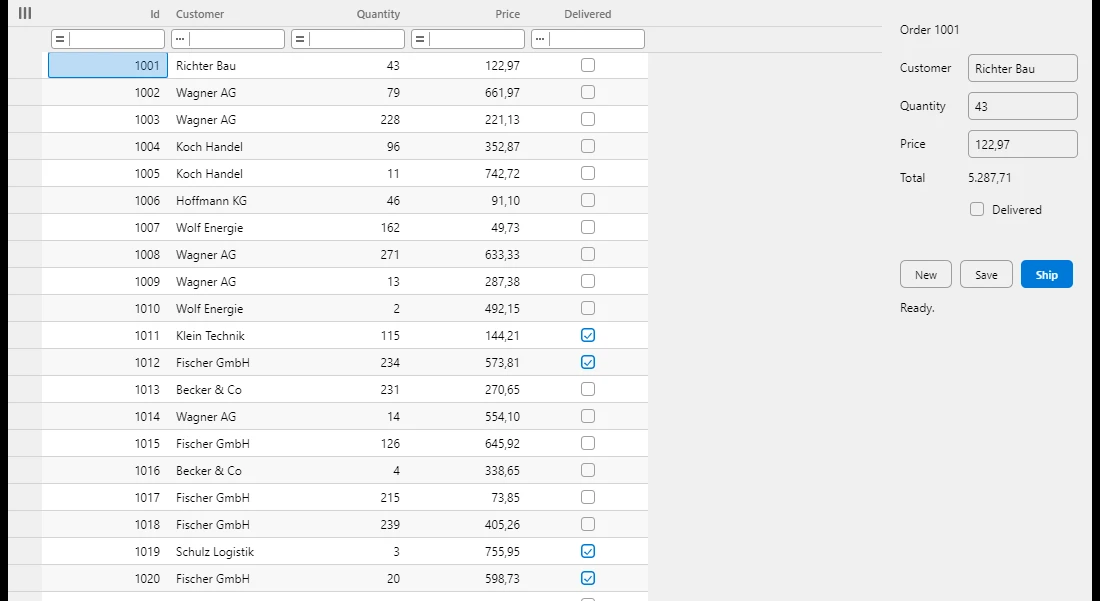
OrderRules: grid, panel, buttons and status line drawn by ArionUI in the Windows colours. WinForms, screenshot of the running sample (0.1.0-preview.1).What is left of WinForms is the window and the splitter. In a real application the next step is a new navigation shell with the old forms loaded beside it, one at a time. The guide shows that path too.
What does not move
The path has limits, and it is better to know them before planning around it:
- .NET 10. The WinForms host targets
net10.0-windows10.0.19041. An application on .NET Framework has to move to .NET first, and that is a project of its own. - No native control inside a board. A report viewer, a browser control or a third-party grid stays a WinForms control next to ArionUI, not inside it.
- No VB6, Delphi or Access. There is no ActiveX wrapper.
- No designer. Boards and columns are written in C#. There is no drag-and-drop surface in Visual Studio.
- Windows only so far. ArionUI is developed and tested on Windows.
- A preview. The API still moves between preview versions. Try the path on one form before you plan a migration around it.
Try it on your own form
Run the sample and switch between the four steps. Without an argument a chooser asks for the step; -- 2 opens one step directly:
dotnet run --project samples/ArionUI.Sample.WinFormsModernize        # chooser
dotnet run --project samples/ArionUI.Sample.WinFormsModernize -- 2   # one step
The full guide with all three paths, including WPF and MVVM, is Modernise a WinForms or WPF app. If you would rather do the first form together with us, there is a free pilot during the preview.